

How does Kafka handle data? #
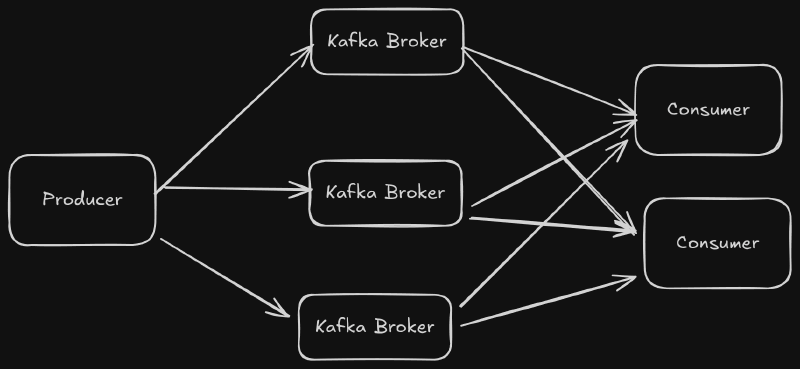
Kafka is a horizontally scalable, high throughput message broker. To understand how to use Kafka effectively, it is important to know how Kafka works underneath the hood.
Topics and Partitions #
Event messages are organized by topic. The Kafka producer sends data to topics, and the consumers can read from topics. Each topic is split into multiple partitions. Partitions allow Kafka to load balance the event message stream across brokers and across consumers. Each partition can be replicated to preserve data security. The partitions for a topic are distributed amongst the brokers. Here is an example with three Kafka brokers and a topic called “test”. The “test” topic has a replication factor of two.
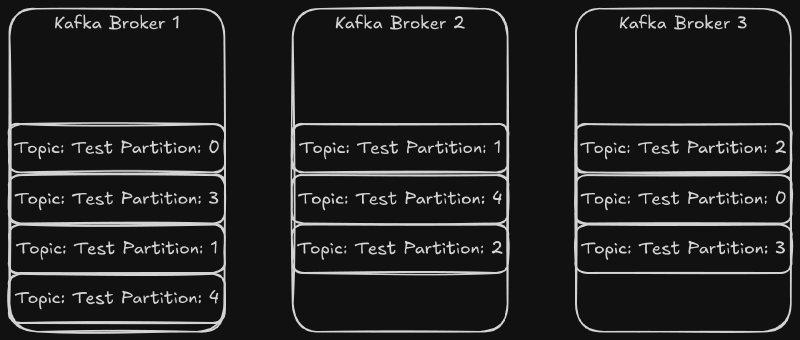
The partitions for the test topic are distributed across the cluster. If one of the brokers went down, all of the topics would be available. If two brokers went down, then two or three partitions would be unavailable depending on the broker that went down.
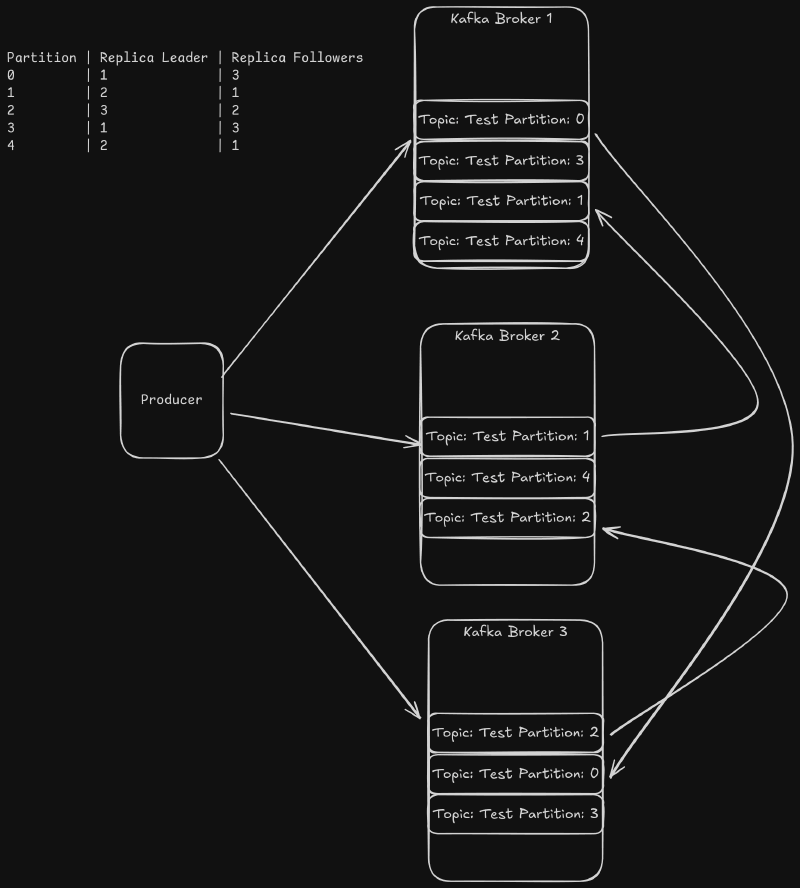
Each partition has a leader replica that is elected by the Brokers based on the available replicas. Each message is sent to the leader of the partition. The leader then sends a copy of the message to all of the follower replicas. In order to minimize data does not get loss, a replica is considered insync if the follower replica has consumed up to the leader’s log offset and has sent a fetch request to the leader before the broker configuration replica.lag.time.max.ms value. If the replica leader broker goes down, the new leader will be elected from the other insync replicas. If there are no insync replicas, then the partition will be down until the leader comes back online.
Producers Send Data to Partitions #
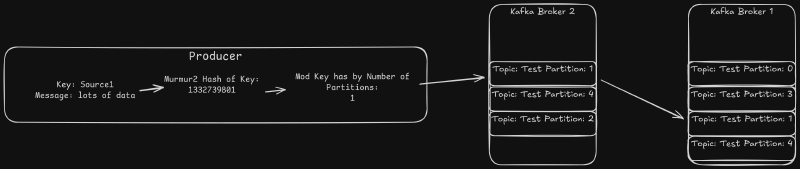
The Kafka producers send events to the brokers in the form of a key and value. By default, the standard Java producer uses a murmur2 hash of the key to determine which partition to use. All of the data for a given key is sent to the same partition. Most clients support the ability to supply a custom partitioner as well. That allows even finer grained control over which partition to use.
Consumers Read Partitions #
Data is read from a topic using the Consumer API. This API allows consumers to form Consumer Groups in order to split the load. Each consumer group gets every event in a topic, and each event is sent to only one consumer in the Consumer Group. Kafka does this by assigning each partition in a topic to a consumer. The consumers read from all of the partitions they have been assigned.
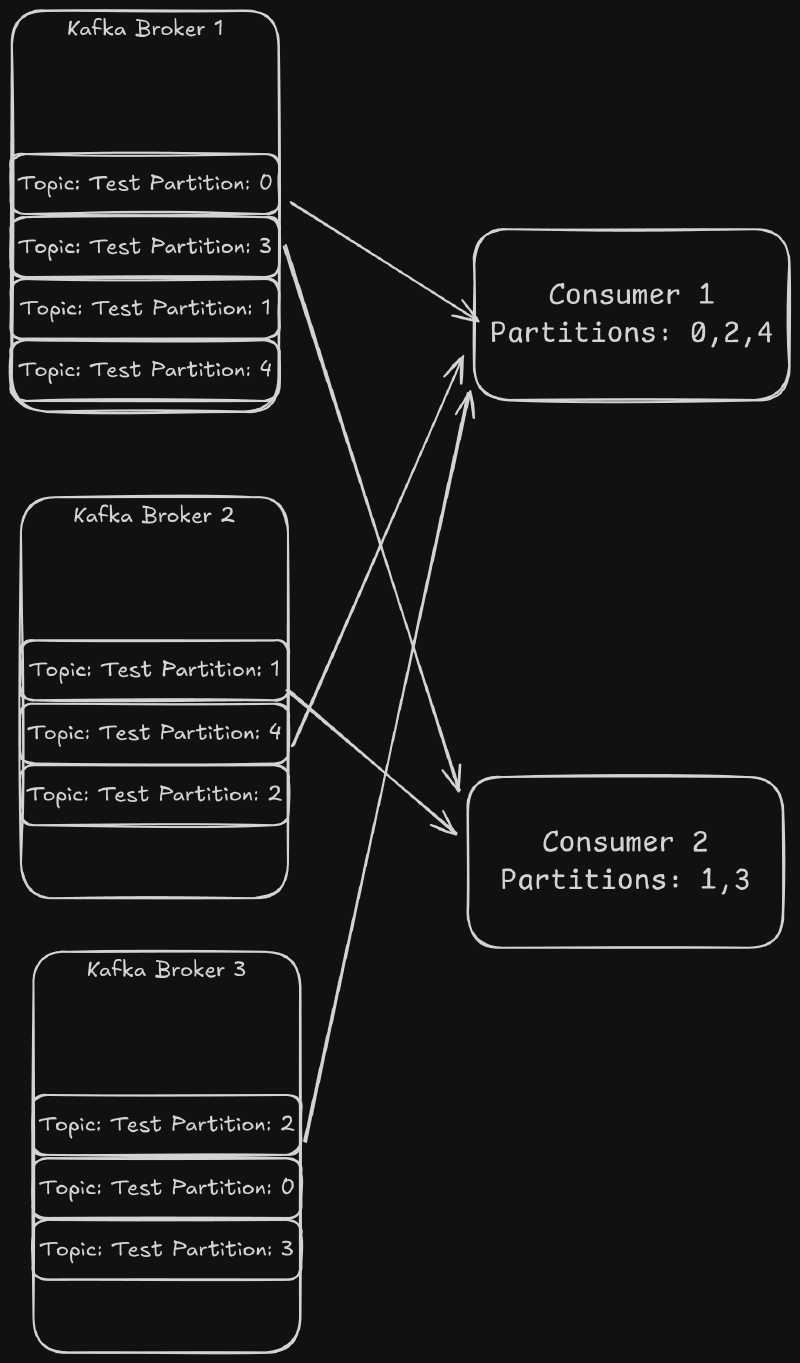
Each time the consumer groups are rebalanced, the partitions assigned are changed. This means that the consumer cannot assume it will always have the same keys. To guarantee the assignment, the default behavior can be overwritten by manually assigning the partitions to each consumer. This requires the consumers to handle the coordination of the partition assignment. This is more complex, but it allows the consumers to be guaranteed to process the same key’s events even if one consumer restarts. There is a danger with this method. If one of the consumers gets into a state where it is not able to consume data, then the partitions assigned to the consumer would not be processed.
How Brokers Store Data #
The Kafka brokers store data in a separate directory for each partition. Inside each partition, Kafka stores each message log in segment files. The segment files contain messages stored using a standard binary format. Messages are always appended to the latest segment files. Kafka will start a new file when the segment size exceeds the segment.bytes configuration for the topic (If not set this defaults to the server log.segment.bytes configuration). This value is important because Kafka cleans up data on a per file basis. Increasing this value decrease the number of files that Kafka will store on disk, but it will reduce the precision with which you can manage the disk usage.
kafka1:/data/kafka-logs/test-3# ls -ltr
-rw-r--r-- 1 root root       10 Jan 19 21:18 00000000000000095206.snapshot
-rw-r--r-- 1 root root       10 Jan 19 21:22 00000000000000101401.snapshot
-rw-r--r-- 1 root root  1048434 Jan 19 21:25 00000000000000101401.log
-rw-r--r-- 1 root root     2976 Jan 19 21:25 00000000000000101401.timeindex
-rw-r--r-- 1 root root     1976 Jan 19 21:25 00000000000000101401.index
-rw-r--r-- 1 root root       10 Jan 19 21:25 00000000000000107595.snapshot
-rw-r--r-- 1 root root  1048544 Jan 19 21:29 00000000000000107595.log
-rw-r--r-- 1 root root     2976 Jan 19 21:29 00000000000000107595.timeindex
-rw-r--r-- 1 root root     1976 Jan 19 21:29 00000000000000107595.index
-rw-r--r-- 1 root root       10 Jan 19 21:29 00000000000000113790.snapshot
-rw-r--r-- 1 root root  1048419 Jan 19 21:33 00000000000000113790.log
-rw-r--r-- 1 root root       10 Jan 19 21:33 00000000000000119984.snapshot
-rw-r--r-- 1 root root     2976 Jan 19 21:33 00000000000000113790.timeindex
-rw-r--r-- 1 root root     1976 Jan 19 21:33 00000000000000113790.index
-rw-r--r-- 1 root root  1048450 Jan 19 21:37 00000000000000119984.log
-rw-r--r-- 1 root root     1976 Jan 19 21:37 00000000000000119984.index
-rw-r--r-- 1 root root       10 Jan 19 21:37 00000000000000126178.snapshot
-rw-r--r-- 1 root root     2976 Jan 19 21:37 00000000000000119984.timeindex
-rw-r--r-- 1 root root 10485756 Jan 19 21:39 00000000000000126178.timeindex
-rw-r--r-- 1 root root 10485760 Jan 19 21:39 00000000000000126178.index
-rw-r--r-- 1 root root 741459 Jan 19 21:39 00000000000000126178.logFor example, if you have the segment.bytes set to 4294967296 bytes (4 GiB), Kafka’s cleanup mechanism will only delete 4 GiB of data at a time. If you are using time based retention, then Kafka will only clean up a log file when all 4 GiB of the data has timed out. This is handled independently for each partition, so the larger the segment files are the more difficult it becomes to manage the disk space used by a topic.
The segment file size can be configured by setting the segment.ms configuration (log.roll.ms to set the server default). If a segment does not reach the segment.size bytes, then Kafka will roll a new segment. This allows you to ensure that stale data gets deleted for low data topics.
How Brokers Delete Data #
Partition segments are cleaned up according to two independent configurations, retention.bytes (log.retention.bytes to set the server default) and retention.ms (log.retention.ms to set the service default). The retention.ms paramenter causes a segment file to be deleted when the latest timestamp in the segment is older than this value. The retention.bytes parameter causes the broker to discard the oldest segments for a partition when the size of the partition exceeds the value. This is handled per partition, so the total disk usage is dependent on the number of partitions assigned to a broker. The file.delete.delay.ms paramenter (log.segment.delete.delay.ms to set the server default) controls how long after a segment is eligible to be deleted the broker waits to delete the file from the file system.
The way that the segments are deleted is controlled by the cleanup.policy (log.cleanup.policy to set the server default) parameter. There are two valid values: delete and compact. If this parameter is set to delete, the old segments are simply deleted.
The compact policy is a bit more complicated. If set, the broker will retain at least the latest message for each key. The broker accomplishes this by periodically compacting the log segments. Compaction rewrites the logs removing all but the latest values. This allows the topic to retain at least one value for each key that it has seen at the cost of the extra processing time of the compaction process. The frequency of compaction can be controlled by tuning the min.cleanable.dirty.ratio (log.cleaner.min.cleanable.ratio to set the server default). This value sets the threshold for how much of a segment has not been compacted before the compaction process runs. Running the compaction less frequently uses less processing power but is less space efficient. You can enable both compaction and delete as well. This causes data to be compacted until the delete conditions (retention.ms and retention.bytes) are met.
Background photo by Conny Schneider on Unsplash